
The iFixit Tri-Point Y1 Screwdriver is a precision repair tool made for three-point Y-shaped screws found in selected electronics. Its Y1 tip suits specialty fasteners used in certain Apple laptop batteries, Nintendo hardware, handheld consoles, and other electronic devices.
A normal Phillips driver does not match a three-point screw head correctly. Using the proper Y1 driver gives the tip firm contact with all three sections of the screw recess. That contact helps reduce slipping, damaged screw heads, and frustrating repair delays.
The tool suits electronics repair and DIY work. It also fits fasteners present on some Apple laptop batteries using Apple Tool 922-8991.
iFixit Tri-Point Y1 Screwdriver Specifications
The screwdriver combines a precision Y1 tip with a hand-friendly handle intended for small electronics work.
| Specification | Details |
|---|---|
| Product | iFixit Tri-Point Y1 Screwdriver |
| Driver type | Tri-point |
| Tip size | Y1 |
| Fastener shape | Three-point / Y-shaped |
| Main use | Electronics repair |
| Handle material | Polymer |
| Driver material | SVCM steel |
| Shaft length | 60 mm |
| Handle features | Rubberized ergonomic grip, knurled grip area, swivel top |
| Apple tool reference | Apple Tool 922-8991 |
| Warranty | Lifetime Guarantee |
Product versions can carry different part numbers or manufacturing details, so checking the selected version before purchase remains sensible.
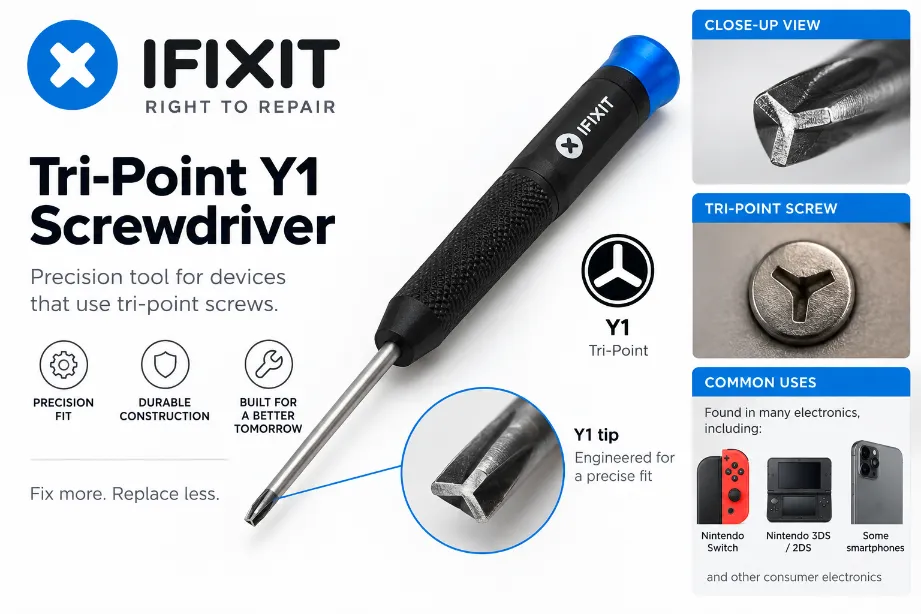
What Makes the Y1 Tip Different?
A Tri-Point Y1 tip uses three arms arranged around the center. The profile matches Y-shaped fasteners rather than the four-slot cross pattern found on Phillips screws.
That shape serves a practical purpose during electronics work. A properly sized tip reaches into the screw recess and transfers turning force across matching surfaces. Poorly matched drivers can slip or deform small fasteners, especially after repeated removal.
The Y1 size also differs from smaller tri-point sizes such as Y000, Y00, and Y0. Those sizes serve other fasteners, so a complete repair bench may require more than one tri-point driver.
Where the iFixit Tri-Point Y1 Screwdriver Gets Used
The Y1 driver appears across several electronics repair jobs. Its exact use depends on the fasteners installed by the device manufacturer.
Common applications cover:
- Selected MacBook and MacBook Pro battery fasteners
- Nintendo handheld hardware
- Game Boy repair projects
- Nintendo DS repair work
- Electronics fitted with compatible three-point Y screws
- Small appliances using matching three-pronged fasteners
- General DIY electronics repair involving Y1 screws
A dedicated Y1 driver offers better contact with compatible fasteners than improvised alternatives.
iFixit Tri-Point Y1 Screwdriver for MacBook Battery Work
One of the main reasons buyers search for this screwdriver involves older Apple laptop battery service. The Y1 driver fits fasteners on some Apple laptop batteries that use Apple Tool 922-8991.
Model verification still deserves attention before opening a laptop. Apple hardware can use several screw systems across different generations and internal locations. A Y1 driver may handle one group of screws while another driver handles case screws or nearby components.
Checking the repair instructions for the exact model helps prevent tool-size mistakes.
iFixit Tri-Point Y1 Screwdriver for Nintendo Repairs
Nintendo hardware provides another practical use for a Y1 driver. Various Nintendo devices use Y-shaped screws that require a matching tri-point tool.
Examples of repair jobs that may call for a Y1 driver cover:
- Game Boy Pocket disassembly
- Nintendo DS repair
- Original Game Boy teardown
- Selected retro handheld restoration projects
- Compatible Nintendo casing screws
For retro-console repair, a dedicated Y1 driver can save the trouble of forcing an unsuitable bit into aging screws.
Grip and Swivel-Top Design
Tiny screws require more fingertip control than large household fasteners. The iFixit Y1 screwdriver addresses that need with a precision-driver layout.
The handle offers:
- A rubberized surface for grip
- A knurled section for controlled rotation
- An ergonomic profile
- A rotating top cap for fingertip pressure
- A narrow shaft suited to electronics work
The swivel top allows the palm or fingertip to maintain downward pressure while the rest of the handle rotates. This arrangement can make repeated screw removal more comfortable, particularly during device disassembly involving several small fasteners.
SVCM Steel Driver Material
The iFixit Tri-Point Y1 Screwdriver uses SVCM steel for its driver material.
Precision screwdriver tips face concentrated force across a very small contact area. Good tip condition deserves attention. A worn, rounded, or damaged tip can slip inside a screw head and make removal harder.
For longer service life:
- Keep the tip clean.
- Use the driver only with matching Y1 fasteners.
- Apply straight downward pressure.
- Avoid using the shaft as a pry tool.
- Store the screwdriver away from moisture.
- Stop turning after resistance becomes excessive.
Good technique protects both the tool and the fastener.
How to Use an iFixit Tri-Point Y1 Screwdriver
Start by confirming that the screw has a three-point Y recess and accepts a Y1-size driver. Seat the tip fully inside the screw head before applying force.
Hold the shaft straight over the screw. Press downward gently and rotate counterclockwise for removal. Slow, controlled pressure works better than abrupt force on miniature fasteners.
During reassembly, turn the screw clockwise with light pressure. Stop after the screw feels secure. Electronics screws are small, and excessive torque can damage threads, screw heads, or nearby plastic mounting points.
For organized repair work, place removed screws in a tray or labeled section matching each disassembly stage.
Tri-Point Y1 Versus Phillips Screwdrivers
The two drivers serve different screw geometries.
| Feature | Tri-Point Y1 | Phillips |
|---|---|---|
| Tip profile | Three-point Y shape | Four-point cross |
| Main fastener | Y-shaped screw | Cross-head screw |
| Electronics use | Specialty fasteners | Broad electronics use |
| Suitable substitute for the other | No | No |
| Main concern with wrong tool | Slipping and screw-head damage | Slipping and screw-head damage |
A Phillips driver may appear close enough at first glance, yet its four-arm profile does not properly match a three-point recess. Forcing one into a Y screw can round the recess and turn a straightforward repair into a difficult screw-removal job.
Tri-Point and Tri-Wing Terminology
Shoppers may see the terms tri-point and tri-wing around repair tools. Retail listings and repair discussions sometimes use the terms loosely.
For purchasing purposes, the exact tip designation provides more useful guidance than relying on a broad three-pronged description. A repair guide calling for Y1 gives a much clearer tool requirement.
Matching the tool to the screw profile protects the fastener and provides better turning control.
Y1 Versus Y0, Y00, and Y000
Tri-point drivers come in several sizes. One tri-point size cannot automatically replace another.
| Size | General Position in Tri-Point Range | Interchangeable With Y1? |
|---|---|---|
| Y000 | Very small precision size | No |
| Y00 | Small precision size | No |
| Y0 | Smaller than Y1 | No |
| Y1 | Larger specialty precision size | — |
Using the repair manual’s specified size gives the best chance of clean screw removal.
A driver that feels loose inside the recess may be the wrong size. Continuing to turn it can damage the screw head.
Benefits of a Dedicated Y1 Screwdriver
A fixed Y1 screwdriver makes sense for repair benches that encounter this fastener regularly.
Practical advantages are:
- No bit swapping during Y1 screw removal
- Direct access to compatible specialty fasteners
- Comfortable fingertip rotation
- Better fit than improvised tools
- Reduced chance of damaging screw recesses
- Convenient addition to an electronics repair kit
- Useful coverage for selected Apple and Nintendo repairs
A dedicated driver can also be easier to grab during repeat repair work than searching through a large bit case.
Possible Limitations
The iFixit Tri-Point Y1 Screwdriver serves one specialized screw profile. That specialization brings accuracy, but it also limits the range of screws the tool can handle.
A buyer may still need Phillips, Torx, Pentalobe, or smaller tri-point drivers for a complete device repair. Some electronics use several screw types within a single assembly.
Product versions, prices, part numbers, and manufacturing details may also vary across markets. Reviewing the exact product specifications before ordering helps avoid purchasing the wrong driver.
Screw Protection Tips
Small specialty screws can become difficult to remove after the recess suffers damage. Careful handling reduces that risk.
- Match the driver size before turning.
- Keep the shaft perpendicular to the screw head.
- Seat the tip fully inside the recess.
- Apply steady downward pressure.
- Avoid excessive torque.
- Never force a driver that feels loose.
- Clean debris from the screw recess before removal.
- Replace a worn driver tip rather than forcing it.
A firm fit should feel stable before rotation starts.
Cleaning and Storage
Precision tools need little maintenance, though basic care helps preserve the tip and handle.
Wipe the shaft and tip with a dry microfiber cloth after repair work. Remove adhesive residue or dirt before storage. Keep the screwdriver in a tool roll, case, drawer organizer, or precision-tool rack so the tip does not strike heavier tools.
Avoid using the screwdriver for scraping, punching, prying, or opening device seams. Those tasks can damage the precision tip.
iFixit Lifetime Guarantee
The iFixit Tri-Point Y1 Screwdriver carries a Lifetime Guarantee under the company’s applicable guarantee terms.
Warranty coverage should still be reviewed at purchase since policies, product versions, and regional terms can change.
Keeping purchase information can also help with future warranty-related requests.
Who Can Use the iFixit Tri-Point Y1 Screwdriver?
The tool suits several repair settings:
- Home electronics repair
- Laptop servicing
- Retro gaming console restoration
- Nintendo handheld repair
- Professional repair benches
- Electronics workshops
- DIY device maintenance
- Tool collections needing a dedicated Y1 driver
Its value rises for anyone dealing with Y1 fasteners more than once. For a single repair, it still offers the correct geometry without resorting to improvised tools.
Is the iFixit Tri-Point Y1 Screwdriver Worth Adding to a Repair Kit?
For devices using Y1 fasteners, the iFixit Tri-Point Y1 Screwdriver offers a purpose-made tip, precision handle, swivel cap, and material suited to electronics work.
Its narrow purpose means it will not replace a complete precision screwdriver set. Instead, it fills the Y1 gap inside a broader repair toolkit.
Anyone working regularly on compatible MacBook batteries, Game Boy hardware, Nintendo DS systems, or other Y1-equipped devices can keep it ready for controlled screw removal.
Does the iFixit Tri-Point Y1 Screwdriver work on MacBook batteries?
It works with fasteners found on some Apple laptop batteries, including compatible fasteners linked with Apple Tool 922-8991. Checking the exact MacBook model before repair remains advisable.
Can a Phillips screwdriver replace a Y1 driver?
A Phillips tip uses a four-point cross profile, while a Y1 driver uses a three-point Y profile. A proper Y1 tool provides a much better match for Y1 fasteners and lowers the chance of screw-head damage.
Does the Y1 screwdriver work on Nintendo devices?
Certain Nintendo hardware uses compatible tri-point fasteners. The Y1 size appears in repair work involving devices such as the Game Boy Pocket, Nintendo DS, and original Game Boy.
Does iFixit offer other tri-point sizes?
Yes. Tri-point screwdriver sizes cover options such as Y000, Y00, Y0, and Y1. The correct choice depends on the screw fitted to the device.
Does the screwdriver have a rotating top?
Yes. The precision handle features a swivel top that assists fingertip control and allows smooth rotation during small-screw removal.
What material does the iFixit Y1 screwdriver use?
The driver uses SVCM steel, while the handle uses polymer construction with grip-focused features.
Can Y1 and Y000 screwdrivers replace each other?
No. Y1 and Y000 represent different tri-point sizes. Using an incorrectly sized driver can create a loose fit and raise the risk of damaging the screw recess.
Is a Y1 screwdriver useful for electronics repair?
Yes, for electronics fitted with matching Y1 fasteners. It works as a specialized addition to a repair kit alongside Phillips, Torx, Pentalobe, and other precision drivers.