
South African students can check their financial aid and funding status online to find out whether their applications have been received, approved, rejected, or are still under review. Students funded through the National Student Financial Aid Scheme (NSFAS) can use the official student portal to track MyNSFAS application progress, review funding updates, and check for outstanding requirements. Regular status checks help students prepare for registration, accommodation arrangements, tuition payments, and other education-related expenses.
Financial aid plays an important role in helping eligible students access higher education at public universities and Technical and Vocational Education and Training (TVET) colleges. By checking application updates and responding to requests promptly, students can avoid unnecessary delays and stay informed about their funding arrangements.
What Is NSFAS Financial Aid?
The National Student Financial Aid Scheme is a South African government funding programme that assists eligible students from financially disadvantaged backgrounds with the cost of higher education. Depending on the applicable funding rules, support may cover tuition fees and approved allowances for expenses such as accommodation, meals, transport, and learning materials.
NSFAS funding is subject to eligibility requirements, available programme rules, institutional information, and the assessment of an applicant’s circumstances. Submitting an application does not automatically mean that funding has been approved.
Students should check their application progress regularly and read every notification sent through official channels.
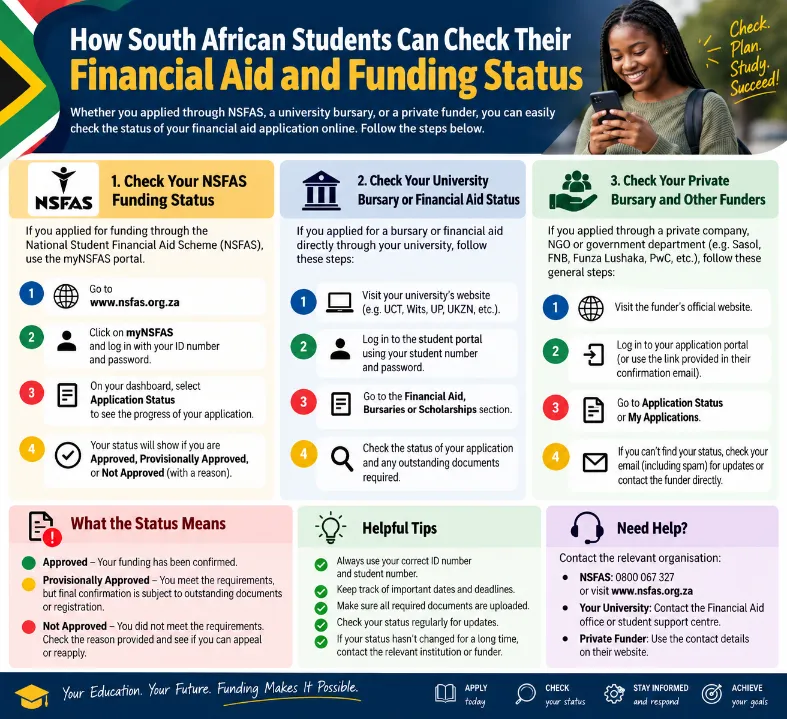
How to Check Your Financial Aid and Funding Status Online
The NSFAS student portal is one of the main ways applicants can check their funding progress. Students should use the official NSFAS website and avoid unofficial pages that request sensitive personal information.
Follow these steps to check your application:
- Open the official NSFAS website at www.nsfas.org.za.
- Find the myNSFAS student portal or login option.
- Enter your registered login details.
- Complete any security verification requested by the website.
- Open your application or funding-status section.
- Read the latest status displayed on your account.
- Check for messages requesting documents, corrections, or additional information.
- Follow the instructions provided through the official portal.
If you cannot access your account, use the official account-recovery process. Avoid creating multiple accounts to solve login problems, as this may cause confusion or complicate support requests.
What Different NSFAS Application Statuses Mean
The wording displayed on an application may vary depending on the stage of processing. Students should read the full message on their accounts rather than relying on a status label alone.
| Application status | Meaning |
| Application Submitted | The application has been sent for processing. |
| Under Review | NSFAS is assessing the application or checking relevant information. |
| Awaiting Documents | Additional documents or information may be required. |
| Verification in Progress | Personal, financial, or other eligibility information is being checked. |
| Provisionally Approved | The application has received a preliminary positive decision, subject to applicable conditions. |
| Approved | Funding has been approved according to the decision displayed on the account. |
| Unsuccessful | The application has not been approved at that stage. Check the reason and any appeal instructions. |
| Funding Eligibility Confirmed | The displayed message indicates a funding-related decision; read the accompanying conditions carefully. |
These descriptions are general guides, not a guaranteed list of current portal labels. The official message on the student’s account takes priority.
An application that remains under review does not necessarily mean it has been rejected. Processing times can differ because of verification requirements, institutional data, application volumes, and other administrative checks.
How to Check University or TVET College Funding
Students attending public universities and TVET colleges should check both their NSFAS accounts and their institutions’ student portals. The two systems may provide different information.
The NSFAS portal generally provides updates about the funding application and related decisions. The institution may provide information about registration, student records, fee accounts, accommodation, and the allocation of approved allowances.
Students should take the following steps:
- Confirm that their institution has received the correct student information.
- Check whether registration has been completed successfully.
- Review the institution’s financial aid or student funding notices.
- Confirm that personal and banking details are correct wherever required.
- Contact the financial aid office if institutional records conflict with the information shown on the NSFAS portal.
An approved funding application and a completed registration record are not always the same thing. Students should confirm both to avoid misunderstandings about their financial arrangements.
How to Check NSFAS Allowances and Payments
Students who have been approved for funding may also need to check their allowance information. The availability, amount, and payment method depend on the applicable funding rules, student circumstances, and institutional arrangements.
To review allowance updates, students should:
- Log in to the official myNSFAS portal.
- Read the latest funding decision and any allowance-related notifications.
- Check their university or TVET college’s student communication channels.
- Confirm whether any required registration or verification steps remain outstanding.
- Review official notices about payment dates and payment arrangements.
Students should not assume that an approved application means every allowance has already been paid. Payment processing and allowance arrangements may require additional steps.
If an expected payment has not arrived, check the information provided by the institution and NSFAS before submitting a complaint. Keep relevant registration details, application references, and official correspondence available to help resolve the matter.
What to Do If Your NSFAS Status Has Not Changed
A funding status may remain unchanged for some time during application assessment or verification. Students should avoid submitting duplicate applications simply because an update has not appeared.
Instead, use this checklist:
- Log in again to confirm that the displayed status is current.
- Check email and SMS notifications linked to the application.
- Look for requests for missing or corrected information.
- Confirm that your institution has submitted the necessary student records.
- Review official announcements about application processing.
- Contact NSFAS through its official support channels if the delay exceeds the stated processing period or requires clarification.
Keep a record of communication with support staff, including dates and any reference numbers provided. This can make follow-up enquiries easier.
How to Handle an Unsuccessful Funding Application
Students whose applications are unsuccessful should read the decision carefully before taking further action. The reason for the outcome may relate to eligibility requirements, verification results, missing information, or another assessment condition.
Depending on the decision and the rules for that application cycle, an appeal may be available.
Students should:
- Read the reason for the unsuccessful decision.
- Check the official NSFAS appeal instructions and deadline.
- Gather documents that support the appeal, where required.
- Submit the appeal through the designated official process.
- Monitor the portal for further messages or a decision.
An appeal does not guarantee approval. Students should submit accurate information and avoid relying on social media claims about guaranteed funding outcomes.
Common Problems When Checking Funding Status
Some students experience difficulties accessing the portal or interpreting the information displayed on their accounts. Most problems can be addressed by checking the account details and following official instructions.
| Problem | Recommended action |
| Forgotten password | Use the official password-recovery process. |
| Incorrect login details | Check the registered email address or username and enter the password carefully. |
| Missing application information | Review the portal and follow any instructions requesting additional information. |
| Status not updated | Check official announcements and contact the appropriate support office if necessary. |
| Allowance not received | Confirm registration, payment arrangements, and institutional records. |
| Personal details are incorrect | Follow the official correction procedure and provide supporting documents if requested. |
Students should never share passwords, one-time PINs, or sensitive banking information with strangers claiming to provide funding assistance.
Tips for Staying Updated About Financial Aid
Checking funding information regularly can help students respond to administrative requests before deadlines pass.
Useful habits include:
- Saving the official NSFAS website in your browser bookmarks.
- Keeping your registered contact details up to date.
- Checking the student portal and institutional notices regularly.
- Reading messages carefully before submitting additional documents.
- Saving confirmation messages and relevant application records.
- Using official support channels instead of paying third parties to check a status.
Students should also monitor their institution’s academic calendar because registration dates and funding-related deadlines may differ between institutions and academic programmes.
Conclusion
South African students can check their financial aid and funding status by accessing the official NSFAS student portal and reviewing the latest application updates. They should also monitor their university or TVET college accounts for registration information, allowance arrangements, and outstanding requirements.
Regular checks, accurate personal details, and prompt responses to official requests can help students manage the funding process more effectively. For application decisions, appeal deadlines, and payment information, always rely on current official NSFAS communications and the relevant institution’s guidance.
1. How can I check my NSFAS funding status online?
Visit www.nsfas.org.za, access the official myNSFAS portal, sign in, and review your application status and notifications.
2. Can I check my financial aid status using my phone?
Yes. You can use a smartphone browser to access the official NSFAS website, provided you have a reliable internet connection and the required login details.
3. What does an application under review mean?
It generally means that assessment or verification is still taking place. Check the portal for specific instructions and wait for an official update.
4. What should I do if my funding application is unsuccessful?
Read the reason for the decision and check whether an appeal is permitted for your application cycle. Follow the official instructions and submit supporting information before the stated deadline.
5. Does approved funding mean my allowance has been paid?
No. Funding approval and allowance payment are separate stages in some circumstances. Check your portal and institutional payment notices for the latest information.
6. Is it safe to use third-party websites to check my funding status?
The safest option is to use the official NSFAS website and your institution’s recognised student portal. Do not share login credentials or pay an unknown person to access your account.