
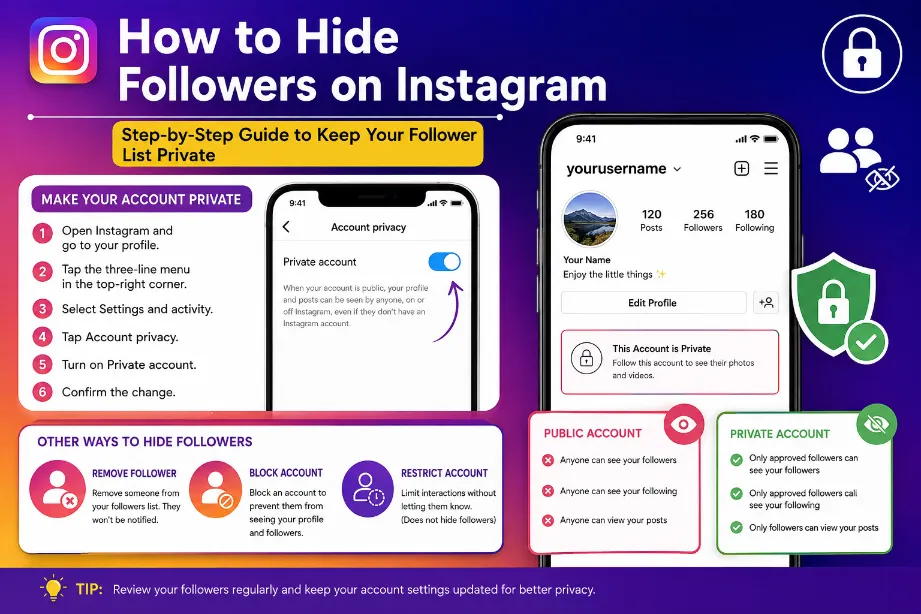
Instagram does not provide a single button that hides your followers from everyone while keeping your account public. You can still limit access to your followers list by switching your account to private, removing selected followers, or blocking specific accounts.
The best option depends on how much privacy you want and who you want to restrict.
Can You Hide Followers on Instagram?
Yes, but Instagram has some limits. A public profile allows other Instagram users to view your follower list. There is no standard setting that makes the follower list completely invisible while keeping the profile public.
| Privacy option | Follower list visibility | Account remains public? |
|---|---|---|
| Private account | Limited to approved followers | No |
| Remove a follower | Removed person loses follower access | Yes |
| Block an account | Blocked account cannot view your profile | Yes |
| Restrict an account | Does not hide your follower list | Yes |
| Hide activity status | Does not hide followers | Yes |
How to Hide Followers on Instagram With a Private Account
A private account gives you the most direct way to control who can see your followers and following lists.
Follow these steps:
- Open Instagram.
- Tap your profile picture.
- Tap the three-line menu in the top-right corner.
- Open Settings and activity.
- Find Account privacy.
- Turn on Private account.
- Confirm the change.
After this change, only accounts you approve can access your follower and following lists.
Your existing followers can still see these lists, so you may need to remove accounts you do not want to have access.
How to Hide Followers From One Person
Instagram does not offer a dedicated option to hide your followers from one specific follower. You can remove that person from your followers, provided your account uses private settings.
Steps:
- Open your Instagram profile.
- Tap Followers.
- Find the account you want to remove.
- Tap Remove.
- Confirm the removal.
Instagram does not send a notification telling the person that you removed them.
How to Hide Your Followers by Blocking Someone
Blocking gives you a stronger privacy option for a specific account.
To block an account:
- Open the person’s Instagram profile.
- Tap the three dots in the top-right corner.
- Select Block.
- Confirm the action.
After blocking, that account cannot access your profile, follower list, posts, or other profile information through the blocked account.
Can You Hide Followers Without Making Your Account Private?
No direct Instagram setting allows this.
If your profile stays public, Instagram generally allows other users to view your follower list. You can still use individual privacy actions such as:
- Removing followers.
- Blocking accounts.
- Limiting unwanted interactions.
- Making your profile private later.
- Keeping sensitive information away from your public profile.
The private account method provides the broadest control over follower visibility.
Does Restricting Someone Hide Your Followers?
No. The Restrict feature focuses mainly on interactions such as comments and direct messages. It does not function as a tool for hiding your follower list.
A restricted account may still be able to view information available through your profile based on your account’s privacy settings.
How to Remove Followers Without Blocking Them
You can remove someone without blocking them.
- Go to your profile.
- Open Followers.
- Search for the account.
- Tap Remove next to their username.
- Confirm the action.
This option works well for people you no longer want following your account but do not want to block.
Private Account vs Blocking vs Removing
| Method | Hides profile from selected person | Removes follower | Good for |
|---|---|---|---|
| Private account | Partly | No | General privacy |
| Remove follower | Yes, for private accounts | Yes | Former followers |
| Block | Yes | Yes | Strong privacy |
| Restrict | No | No | Limiting interactions |
Why Instagram Does Not Have a Hide Followers Button
Instagram separates profile visibility from interaction controls. The platform provides privacy tools such as private profiles, blocking, and follower removal, but it does not provide a separate setting for hiding the follower list from selected accounts while keeping the profile public.
This means your practical options depend on your preferred level of privacy.
Tips for Keeping Your Instagram Followers Private
- Use a private Instagram account for stronger control.
- Review your followers regularly.
- Remove accounts you no longer want connected to your profile.
- Block accounts that you do not want accessing your profile.
- Avoid sharing sensitive personal details publicly.
- Check your privacy settings after major Instagram updates.
- Be careful with third-party apps claiming to hide followers, as they may request access to your Instagram account.
Final Takeaway
The simplest way to hide followers on Instagram is to switch your profile to private and approve only the accounts you trust. For one specific account, removing the follower or blocking the account gives you more control. Instagram currently does not provide a separate button that hides your follower list while your profile remains public.
Can I hide my followers from everyone on Instagram?
You cannot completely hide the follower list from every approved follower through a standard Instagram setting. A private account gives you greater control over who can access your profile and follower information.
Can I hide my followers without a private account?
There is no direct setting for this. A public profile does not provide a dedicated follower-list hiding option.
Can someone see my followers after I block them?
A blocked account cannot access your profile and follower list through the blocked account.
Does Instagram notify someone after I remove them?
Instagram does not send a direct notification saying that you removed them as a follower.
Can I hide my following list too?
The same privacy rules apply to your following list. A private account provides more control over who can access your follower and following information.