
Students can track an NSFAS application online through the official NSFAS platform. The myNSFAS account allows applicants to view application progress, funding decisions, requests for information, and other updates connected to their applications.
NSFAS Application Tracking Steps
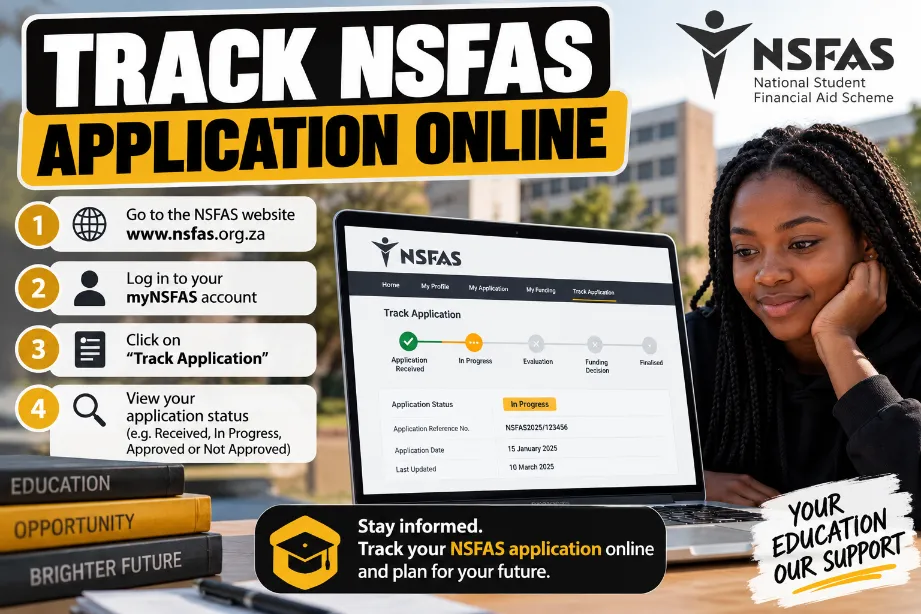
Follow these steps to check your NSFAS application status:
- Visit the NSFAS website.
- Open the myNSFAS section.
- Select the login option.
- Enter your registered email address and password.
- Open your application dashboard.
- Find the current status of your application.
- Read any message shown on the dashboard.
- Provide any requested information or documents.
NSFAS Application Status Online
The status displayed in your myNSFAS account can show the current stage of your application. Different statuses may appear during the assessment process.
| NSFAS Status | Meaning |
|---|---|
| Application Submitted | NSFAS has received your application. |
| Filtering | Your application details are being checked against basic funding requirements. |
| Validation | Submitted personal and supporting information is being checked. |
| Evaluation | Your application is being assessed for funding. |
| Funding Eligibility | Your financial and academic information is being assessed. |
| Awaiting Academic Results | Academic results or related information may still be required. |
| Provisionally Funded | A provisional funding decision has been recorded, subject to required checks. |
| Unsuccessful | The application has not been approved based on the assessment. |
| Withdrawn | The application has been withdrawn from processing. |
Status names and processing stages can vary between application cycles.
How to Check NSFAS Status on a Phone
You can check your NSFAS application staus using a smartphone. Open your mobile browser, access the NSFAS website, sign in to myNSFAS, and view your application dashboard.
Keep your login information private and avoid entering your account details on unofficial websites.
What You Need to Track an NSFAS Application
Keep these details available:
- Registered email address
- myNSFAS password
- South African ID details linked to your account
- Registered mobile number
- Internet connection
- Access to your myNSFAS account
What to Do After Checking Your NSFAS Status
Your next step depends on the status displayed in your account.
- Application Submitted: Check your account for further updates.
- Filtering or Validation: Allow the application checks to proceed.
- Awaiting Academic Results: Check with your institution about academic records.
- Provisionally Funded: Read the instructions shown in your myNSFAS account.
- Unsuccessful: Review the reason and check whether an appeal option applies.
- Withdrawn: Read the message linked to the withdrawal.
NSFAS Application Status Not Updating
An NSFAS application status may remain unchanged during busy processing periods. Applicants can check their dashboard regularly and review any messages connected to the application.
Try these steps:
- Sign out of your account.
- Sign in again.
- Check your internet connection.
- Confirm that you are using the account used for your application.
- Review your dashboard for new messages.
- Check NSFAS announcements for application updates.
- Contact NSFAS support if the issue remains unresolved.
How to Track NSFAS Appeal Status
Students who submit an appeal can check their appeal-related updates through their myNSFAS account. Sign in and review the application or appeal section.
An appeal may require supporting documents. Read the instructions in your account and submit the requested documents through the specified process.
NSFAS Status Check for Returning Students
Returning students can use their existing myNSFAS account to view funding-related information. Academic or registration details may also affect the information displayed in the account.
Check your NSFAS account and institutional records for pending requirements.
Common NSFAS Tracking Problems
| Problem | Possible Action |
|---|---|
| Password does not work | Use the account recovery option available through NSFAS. |
| Application does not appear | Confirm that you signed into the account used during application. |
| Status has not changed | Check the dashboard again later and review NSFAS messages. |
| Missing documents message | Review the requested documents and submit them through the stated process. |
| Appeal information is missing | Check your application dashboard and NSFAS messages. |
| Personal details are incorrect | Follow the NSFAS process for updating account information. |
NSFAS Application Tracking Tips
- Check your myNSFAS dashboard regularly.
- Keep your registered email account active.
- Review messages connected to your NSFAS profile.
- Use the account linked to your application.
- Keep copies of documents submitted to NSFAS.
- Never share your password or OTP.
- Use official NSFAS communication for application updates.
Use your myNSFAS account to check your application status and review every notification connected to your application. Respond to requests for information, keep your account details secure, and check your dashboard regularly for new updates.
How can I track my NSFAS application online?
Sign in to your myNSFAS account and open your application dashboard. The dashboard displays the latest available application status and related messages.
Can I check my NSFAS status on my phone?
Yes. A smartphone with an internet connection can access myNSFAS through a mobile browser.
How long does NSFAS application processing take?
Processing time can vary between application cycles. Verification, academic records, financial checks, and other requirements can affect processing. Check your myNSFAS dashboard for the latest status.
What should I do if my NSFAS application shows unsuccessful?
Read the reason displayed in your account. Students who meet the requirements for an appeal can follow the appeal instructions provided by NSFAS.
Can I track NSFAS funding after approval?
Yes. Your myNSFAS account can show updates related to your funding status and application information.