
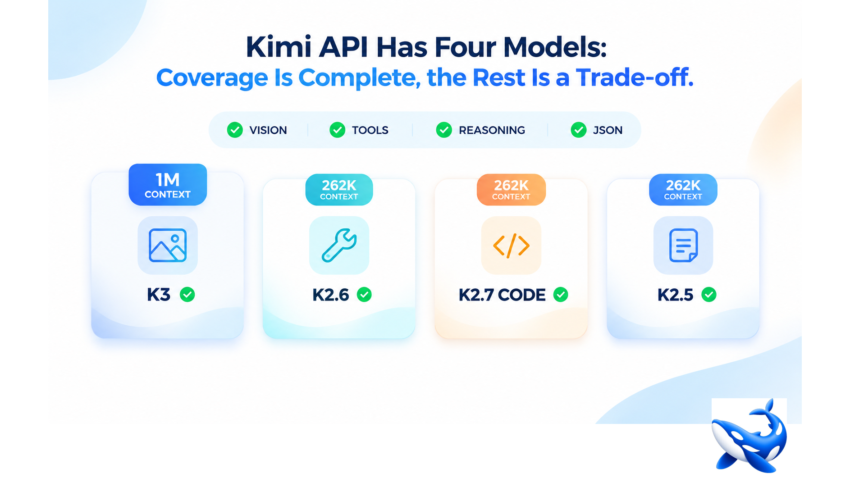
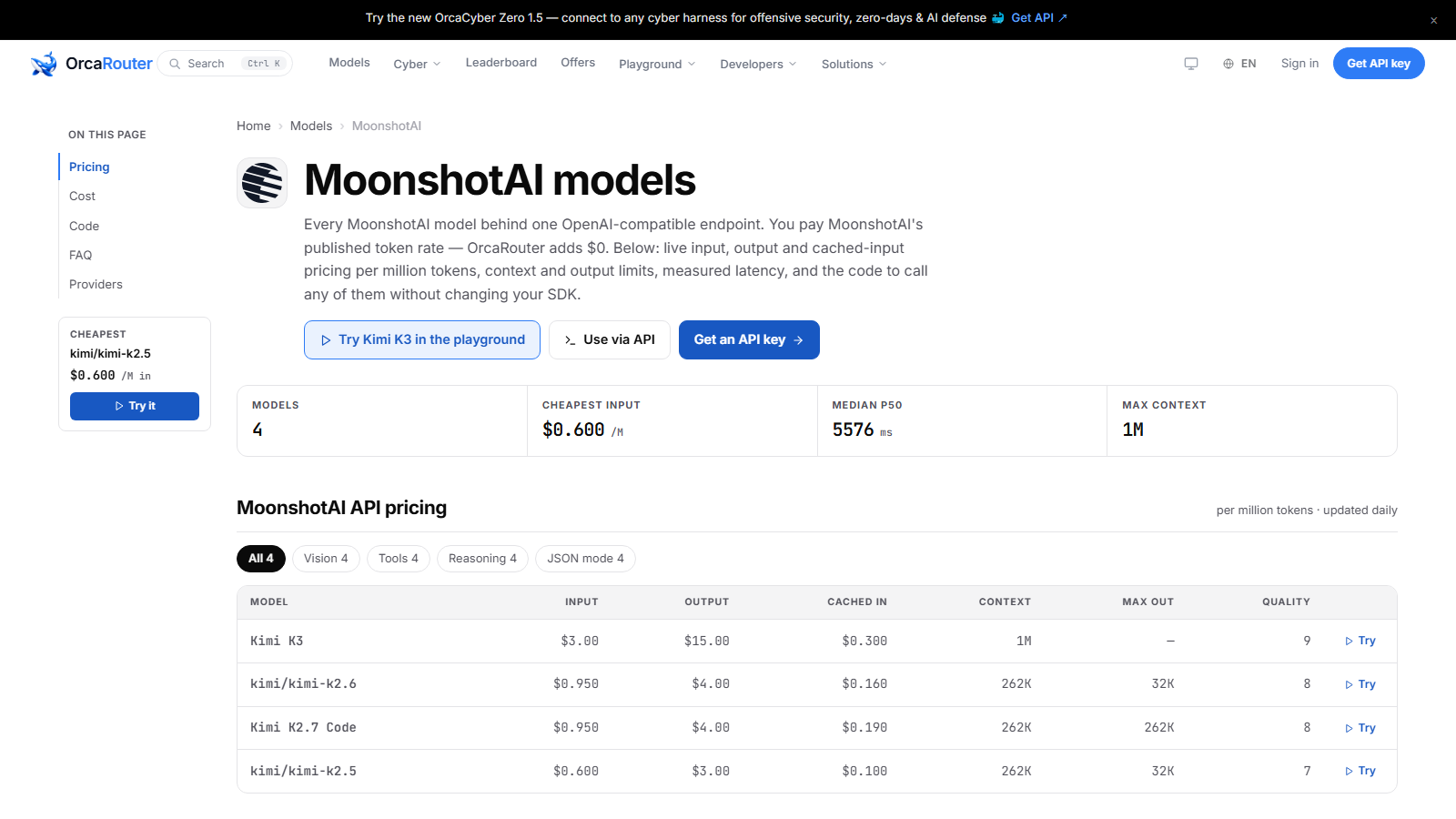
The Kimi catalogue on the OrcaRouter gateway is the smallest table worth reading carefully. The Kimi API provider page lists exactly four models — Kimi K3, kimi/kimi-k2.6, Kimi K2.7 Code and kimi/kimi-k2.5 — and all four of the capability flags the page tracks, vision, tools, reasoning and JSON output, are present on all four rows, a 4-for-4 pass rate that several larger catalogues do not manage [OURS]. Coverage is complete before the table is even finished loading.
So the decision in front of you is not whether Kimi has a model for your job. On capability flags it does, all the way down. The real decision is which of the four to route to, and the table splits on three things that capability flags cannot see: only one model holds the full context window, the median latency on the page is the slowest of any provider on the gateway, and the cheapest row also carries the lowest quality composite in the catalogue.
Four models, a perfect capability pass rate
Every provider page on the gateway carries the same four capability counts, and Kimi’s are the only ones that come out 4 out of 4 across the board [OURS]. All four models accept text, all four are also flagged for image input, and every row carries tool calling, reasoning and structured JSON output. That uniformity is the useful part: no workload gets disqualified at the gate for choosing the wrong Kimi model on capability grounds.
The prices are where the rows stop being uniform. Cheapest input in the catalogue is $0.600 per million tokens on kimi/kimi-k2.5 [VENDOR]. The page’s own 0–10 quality composite — a first-party score, not a third-party benchmark — runs 9, 8, 8 and 7 down the four rows [OURS]. So the catalogue compresses the entire spread between its cheapest and its flagship into about one-third of the available quality range while tripling the input price.
Only Kimi K3 reaches the 1M window
The sharpest split in the table is context. Kimi K3 carries a 1M context window with a 384K ceiling on output; the other three rows — kimi/kimi-k2.6, Kimi K2.7 Code and kimi/kimi-k2.5 — all stop at 262K [VENDOR]. In the same catalogue, one model ingests an entire repository in a single call while the other three have to be fed in slices, and that difference does not show up in any capability flag.
The model page’s own figures put the K3 window at 1,048,576 tokens, which is the number behind the table’s shorthand [VENDOR]. The page’s FAQ answers in more conversational terms, referring to “Kimi K3, at 1048K tokens” [VENDOR]. Both figures describe the same window in different registers, so keep them apart when you quote the page. Whichever you use, the gap against the 262K siblings is not a rounding difference — it is the single largest functional gap in the table.
The slowest median on the gateway
Latency is the second split, and it is measured with the same statistic the other provider pages use. The Kimi page’s header statistic is a median p50 of 5681 ms — the slowest of the seven provider catalogues on the gateway, against 1600 ms on the OpenAI page and 1816 ms on the DeepSeek page [OURS]. All three numbers are the same header caliber, median time-to-first-token in milliseconds, so the comparison is apples to apples: on a page that promises equal routing, a Kimi call is expected to wait longer before the first token than a call to any other provider on the gateway.
That is not a judgment about quality. A slow median shared by all four rows of a small catalogue is more plausibly a property of how the provider’s models are served than a statement about how well they answer. But for an interactive product where the first token decides whether the user stays, the header statistic is the one that matters before any answer arrives.
Kimi K3: the model page that refuses your sampling params
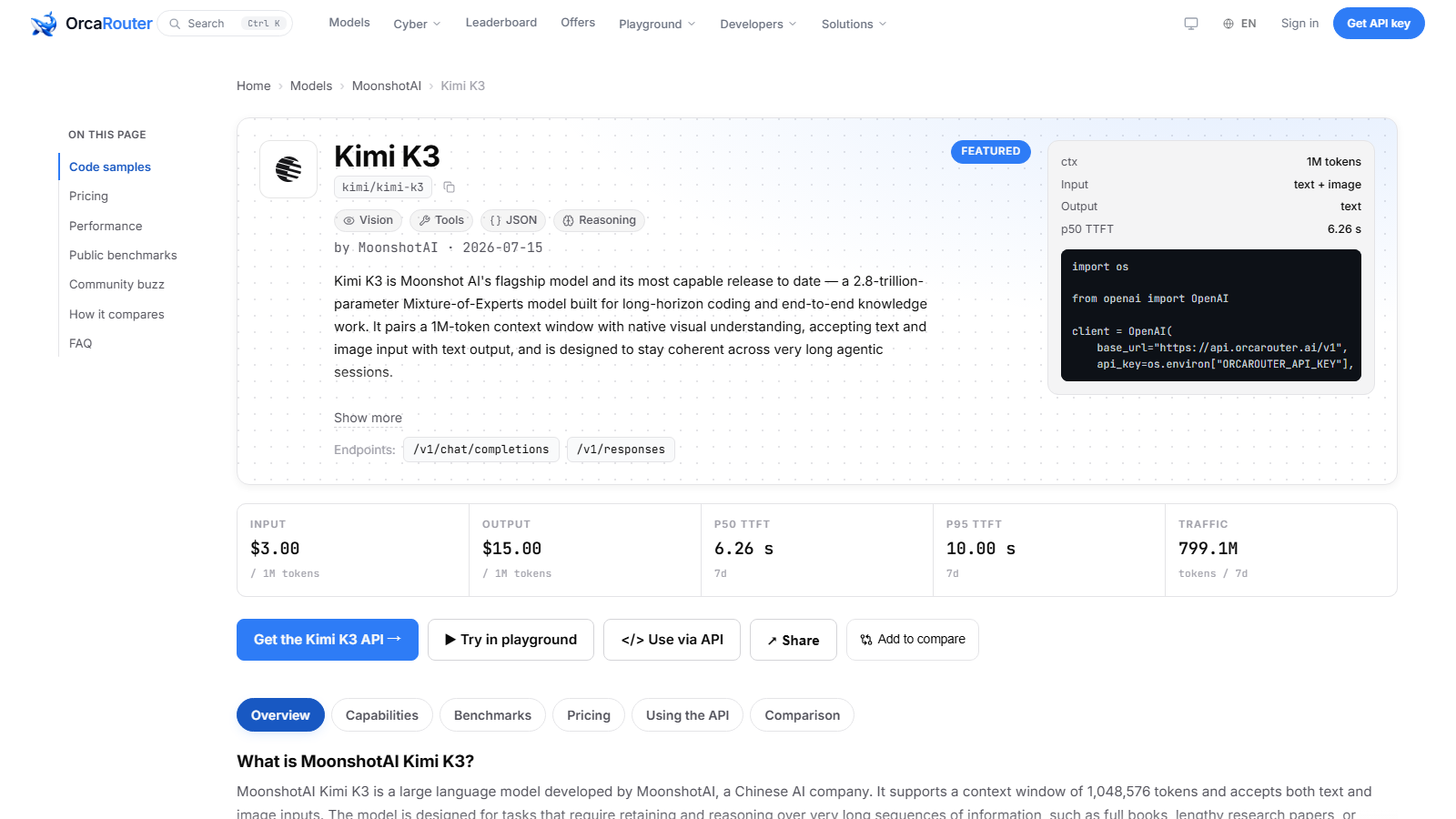
The flagship’s own model page is where the catalogue stops being a price list and becomes a spec. kimi/kimi-k3 is a 2.8-trillion-parameter Mixture-of-Experts model with a 1,048,576-token context window and native vision — text and image in, text out [VENDOR]. It is billed at $3.00 per million input tokens and $15.00 per million output tokens, the top of the Kimi table [VENDOR].
The parameter surface is the part most callers will trip on. Kimi K3 does not accept sampling parameters at all: no temperature, no top_p, no seed [VENDOR]. Reasoning depth is controlled through a single top-level reasoning_effort control instead [VENDOR]. The vendor positions the model squarely for programming agents — the page names Codex, Claude Code, Cline and RooCode as the scenarios it was built for, alongside deep reasoning and knowledge work [VENDOR]. A codebase that already sets temperature on every call will simply have that parameter ignored, so the migration note is real: port the client, then delete the sampling block.
The measured latency on the model page is reported in seconds, as model pages report it: a p50 time-to-first-token of 6.97 seconds over the same seven-day window [OURS]. That is the model-page figure, distinct from the provider-page median, and it is consistent with the catalogue being the slowest on the gateway.
What the split means for a workload
Read together, the four rows resolve into three decisions. If the job needs more than 262K tokens of context in one pass — a full repository, a book-length document — Kimi K3 is the only row that fits, at $3.00 input [VENDOR]. If the job is agentic coding where the model steers tools across many turns, K3’s coding-agent positioning and its reasoning_effort depth control are the reason to pay the flagship price [VENDOR]. If the job fits inside 262K and needs image understanding, kimi/kimi-k2.6 and Kimi K2.7 Code both accept images at $0.950 input, the Code row doubling the output ceiling to 262K [VENDOR]. And if the job is high-volume text within a modest window, kimi/kimi-k2.5 at $0.600 input is the row that keeps per-token cost in check [VENDOR].
The decision rule is short. Buy context only when the input genuinely occupies it. Buy the flagship when the agent needs the reasoning depth control. Everything else — and most traffic is everything else — belongs on the $0.600 or $0.950 rows, and the capability pass rate says none of those choices costs you a feature flag.
The takeaway
Kimi’s catalogue of four covers every capability the gateway tracks, a perfect 4-for-4, with the cheapest input at $0.600 per million tokens [VENDOR]. The trade-offs are all in the table’s second column and in the header statistics: one 1M model against three 262K models, and a median p50 of 5681 ms that is the slowest on the gateway [OURS]. A catalogue this small is easy to misread as thin. It is not thin — it is three clear budget tiers and one clear flagship, and the flags on all four rows are exactly the same. The decision was never about capability coverage; it was always about which of the two splits you can tolerate.
Sourcing note: all prices, context figures, capability flags, parameter restrictions and vendor positioning are the vendor’s own published figures as reproduced on the provider and model pages [VENDOR]. The catalogue size, the 4/4 capability census, the 0–10 quality composite, the provider-page median p50 statistics for Kimi, OpenAI and DeepSeek, and the model-page p50 time-to-first-token (6.97 s) are OrcaRouter’s own, measured or derived from our own pages over a seven-day window [OURS]. The milliseconds equivalent of the model-page TTFT is arithmetic. No third-party benchmark figures are used. Telemetry figures are rolling and will drift. Read 2026-10-15.